

Residential Parking lot snow removal starts Feb. 3
spring break parking notice
All 2026-2027 Permits will be available after July 15
Parking Rules & Regulations
All permit holders must read, understand, and comply with UMaine Parking Rules & Regulations prior to obtaining a parking permit.
In order to ensure the orderly flow of traffic, maximum utilization of parking facilities, and access to buildings for emergency vehicles, it is necessary to establish and enforce rules governing vehicle operation and parking on campus. The policies governing parking at the University of Maine are set forth in the following rules. Please read them carefully, as they apply to everyone utilizing roadways and parking lots at the University of Maine.
Motor Vehicle
Any automobiles including motorcycles, but not including snowmobiles.
Registration
Information required by Parking & Transportation Services and provided by the driver or owner – name, address, and vehicle information.
Permit
The means of identification by the use of a pre-numbered, color-coded hangtag-style permit displayed from the rearview mirror of the vehicle.
Temporary Permit
Issued for students and employees for up to a 7-day period. No more than 3 temporary permits will be issued per semester unless otherwise approved by the Parking & Transportation Services.
Permit Color Designation
Color codes on permits, signs, and parking maps that identify the corresponding permits/lots for ease of recognition. All vehicles parked on campus require a parking pass/permit, including visitors. All other vehicles are prohibited from parking therein unless special permission is granted by Parking & Transportation Services.
Permit holders should read the front and back of their permit to clarify their lot color designations. A replacement permit will be provided for a $10.00 processing fee. Only one permit is allowed per person. Permits stolen are to be reported to UMaine Police Department; permits lost are to be reported to Parking & Transportation Services. A vehicle displaying a reported lost or stolen permit will be cited and subject to towing.
Parking Lots
The designated paved areas on the University of Maine Campus, or University of Maine owned or controlled property. Signage should be noted at the entrance or plainly within view stating the restriction of the lot.
Lot designation is subject to change. Posted signage will always take precedence over any campus map.
Parking Lot Color Designation
Lot designation is subject to change. Posted signage will always take precedence over any campus map.
- Blue color parking lots signs – indicate designated lots for use by Blue permit holders.
- Red color parking lots signs – indicate designated lots for use by Red permit holders.
- Black color parking lots signs – indicate designated lots for use by Black permit holders.
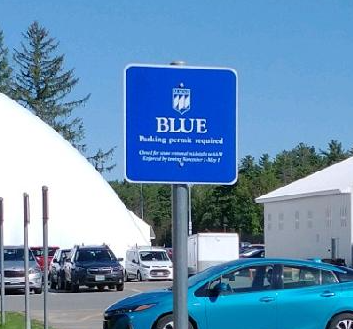
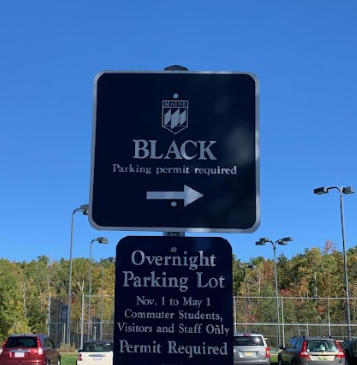
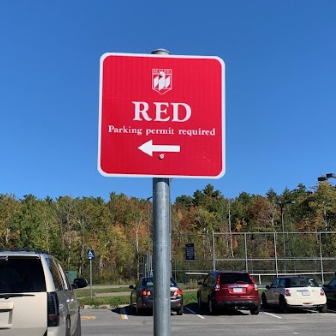
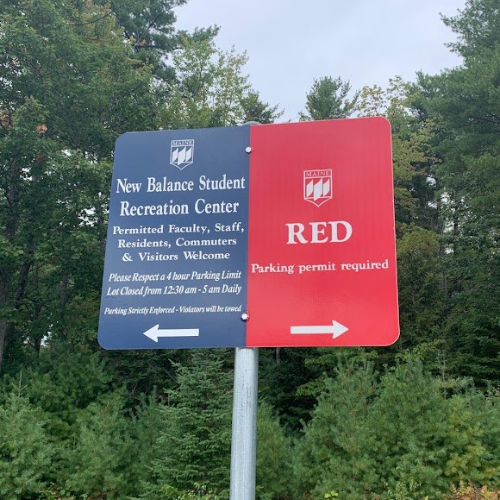
(Left of the split is Rec Center, Right of the split is Resident parking). These are not mixed lots.
*Note that blue permits are valid in both blue and black designated parking lots.
Motorist Assistance – Broken Down Vehicle
In the event of an emergency or mechanical failure, please immediately notify Parking and Transportation Services at 207-581-4047 during regular business hours or the University Police Department at 207-581-4040 after business hours. The owner or driver of the vehicle must arrange for the vehicle to be moved as soon as possible or as otherwise directed.
Also, see the Black Bear Safe App for safety and security while walking on campus.
Motorist Assistance – Jump Start
The University of Maine Parking and Transportation Services office provides complimentary vehicle jump starts on campus when officers are available. This service is provided Monday through Friday from 8 am until 4 pm excluding University recognized holidays.
- Monday – Thursday 8 a.m. to 4 p.m. call 207.581.4047
- Monday – Friday after 4 p.m. and weekends call 207.581.4040
Motorist Assistance – Loading Zone pass requests
Are you moving in or out of a dorm or office? Do you need to load or unload large items such as art pieces or groceries? If so, please request a loading zone pass at the Parking Office, either in person or via an email request. This will allow you to park in the loading zone area of the building without issue. Fire lanes should never be used for this purpose.
- To park in an accessible space, an individual must also have a state-issued accessible permit/placard or plate and a valid University of Maine parking permit. Parking & Transportation Services can issue a temporary accessible parking permit valid for one week while waiting for a State-issued disabled plate or placard.
- Tenant organizations, regularly using a building or area owned by the University of Maine, are authorized to display a purchased color-coded permit to park in the designated areas.
- Vendors, contractor personnel, and servicing organizations must register their vehicles for parking authorization in established parking lots or other locations. Fees will be charged for vendor parking permits, which must be displayed for parking purposes.
- Visitor-designated parking spaces are only for visitors to the campus. Faculty, staff, and students are not to park their vehicles in visitor-designated spaces.
- Future Black Bear Spaces – Requires a Future Black Bear pass issued by Admissions for campus tours. These can be obtained as part of the RSVP process or at the tour check-in desk.
- Parking is prohibited on all Hotel Ursa property without a proper “Hotel Ursa Parking Pass”. These passes are issued at the Hotel Ursa front desk to guests of the hotel. UMaine parking permits alone are not valid on Hotel Ursa property.
- All Resident Student lots are restricted at all times to resident-permitted vehicles only.
- Parking in other than color-coded lots is prohibited and will result in your vehicle being towed. Special authorization may be obtained from the Parking & Transportation Services.
- Any vehicle, illegally parked will be prima facie evidence that it has been parked by the person in whose name the permit is assigned, and/or by the registered owner recorded at the Bureau of Motor Vehicles.
- No vehicle may be operated on University roadways if it violates any state or local municipal ordinance. All violations involving moving vehicles are processed through District Court.
- The speed limit, unless otherwise posted, is twenty-five (25) miles per hour and fifteen (15) miles per hour through University Park, conditions permitting.
- Motor vehicles may not be left on University-owned/controlled property for any extended period of time during vacations, or for an academic field trip, athletic trip (athletes and spectators), or other University related business trip, without prior permission and instructions from the Parking & Transportation Services Office.
- Motor vehicles using any parking area must be registered (State and University), in operating condition at all times, and in compliance with these Rules.
- Any person using any parking area will cooperate during periods of snow removal, or when the parking area has been closed for an authorized event, by moving their vehicle promptly when requested by University staff.
- Prior to having a motorcade on campus, a permit must be obtained through the UMaine Police Department.
- Parking citations must be answered within 10 days.
- Citations can be paid at Parking & Transportation Services (Office 523 DTAV, Community Center). We accept payment via check, money order, cash, credit/debit card at the office or over the phone. A student’s unpaid fees, that are at least 14 days old, will be automatically transferred to the student’s account at the Bursar’s Office. Failure to pay an outstanding balance may result: The inability to register for classes, transcripts or graduation diplomas being withheld, referral to a collection agency or loss of parking privileges, until fines are paid in full.
- No vehicle may park or stop within twenty (20) feet of any fire hydrant. All vehicles will be towed.
- Occupants’ vehicles parked at the University Park will utilize the space provided by the apartment as identified by Student Auxiliary Services.
- Motor vehicles are prohibited on the bikeway. Exceptions are maintenance and emergency vehicles performing routine patrol or responding to an emergency on the bikeway.
- The University of Maine assumes no responsibility for damage to, or theft from, any vehicle parked at any University parking area or elsewhere on University property, or any vehicle which is damaged while being towed or in storage as herein provided for.
- The University Of Maine assumes no responsibility for fees resulting from the towing and storage of vehicles failing to obey the rules and regulations.
- RV parking – RV’s (motorhome/trailer/camper/passenger car) that fit a regular size parking space are limited to parking on campus during regular business hours. If staying overnight, in a designated overnight parking lot, the vehicle can not be used in a sleeping or living capacity. RV’s larger than a regular parking space should contact Parking Services for special permission and the best location to park while on campus during regular business hours. For overnight accommodations there are many local businesses in the greater Bangor area that are RV friendly, as well as local campgrounds.
- In compliance with Maine State Department of Environmental Protection Regulations, mechanical repairs to all vehicles, with the exception of changing a flat tire or jump-starting a dead battery, are prohibited on campus. Vehicles requiring other mechanical repairs must be driven or towed to an off-campus service facility. Changing or draining any vehicle fluids is prohibited on University property. All University vehicles must be serviced in locations designated for that purpose. The washing of motor vehicles is prohibited on campus, and vehicles must be washed at locations dedicated for that purpose.


- Overnight Parking Ban – All Faculty/Staff, Commuter, and Visitor parking areas and all roadways and driveways are closed to parking from November 1 to May 1 of each year between the hours of midnight and 6:00 AM, regardless of the weather. Vehicles parked in violation will be subject to being ticketed and towed at the owners’ expense.
- Faculty/staff or visitors displaying blue or black permits may park overnight in either the commuter section of the Bridge Tennis Court lot or the College Ave South lot. Residents with red permits should only park in red lots per their permit. Please remind visitors to campus of this policy to avoid their vehicles being cited or towed.
- Motor vehicles parked on campus must have a permit/pass and be registered with Parking & Transportation Services when on campus.
Failure to comply with the Rules and Regulations may result in being cited, removed, and towed or immobilization; and/or other appropriate disciplinary actions, including, but not limited to, proceedings under the Student Conduct Code; proceedings under State of Maine law or any combination of such penalties. Additional citations can be issued if the original violation is not corrected within 24 hours. If after 24 hours the vehicle is still in violation another citation can be written.
Charges for violations of these rules may be waived by payment of the fines (effective as of 07/01/22):
Accessible/Handicap Violation
|
Fine: $200
- No current UMaine disabled permit or placard displayed.
- No valid state disabled plate or placard displayed.
- Parked in the accessible/handicap egress area (zebra striped).
Fire Lane Violation
|
Fine: $150
- Parking in a posted Fire Lane.
Unauthorized Permit/Vehicle Violation
|
Fine: $100
- Using an unauthorized permit that has been altered, found, stolen, or counterfeited.
- A vehicle has been found on campus which does not have the right to be.
- Having a suspended or revoked parking account status.
Unpaved/Turf Area Violation
|
Fine: $50
- Parking in an unpaved area or on the turf.
Failure to Obtain a Permit Violation
|
Fine: First violation $50, Second violation $100, Third (or more) violations $200.
- Failure to register a vehicle with Parking and Transportation Services after receiving three or more citations (including warnings) for “No Permit.” This citation fee will double if another “Failure to Obtain” violation occurs and a permit is not purchased. Maximum citation of $200.
Parked On/Obstructing Sidewalk Violation
|
Fine: $50
- Parking on a sidewalk, pedestrian path, safety zone or in an area or manner constituting a safety hazard.
Improper Permit for Space Violation
|
Fine: $50
- Parking in violation of permit issued.
Loading Zone Violation
|
Fine: $50
- Parking in a posted “Loading Zone” space.
Bus Stop Violation
|
Fine: $50
- Parking in the posted bus stop area.
Overnight Parking Ban Violation
|
Fine: $50
- Parking in lots that are closed to overnight parking due to the Overnight Parking Ban:
- All Faculty/Staff (Blue) and Commuter (Black) parking lots and all roadways and driveways are closed to parking from November 1 to May 1 of each year between the hours of midnight and 6 a.m., regardless of the weather.
Lot Closed Violation
|
Fine: $50
- Parking in lots that have been closed for snow removal, maintenance, or a special event.
No Parking Violation
|
Fine: $50
- Parking in “No Parking” areas:
- In roadways
- On cement islands
- On striped areas/zebra strips
- In front of dumpsters
- Obstructing a driveway
- Obstructing a street
- Obstructing a vehicle or
- Obstructing a bicycle lane
Service Vehicle Violation
|
Fine: $50
- Parking in a posted “Service Vehicle” space.
Not EV/Charging Violation
|
Fine: $50
- A non-electric vehicle parked in any EV space (staff or public).
- Parked in a public pay-to-charge EV charging space for more than 30 minutes after EV charging has ended.
- Parked in a public pay-to-charge EV charging space and not plugged in.
No Permit Displayed Violation
|
Fine: $25
- Parking without a permit (no permit).
Overtime Parking Violation
|
Fine: $25
- Parking overtime in a “timed” space.
- Parked overtime in a mobile-pay space without payment.
Failure to Display Permit Violation
|
Fine: $20
- Failure to display a parking permit after it has been purchased and is valid.
Multiple citations can be issued in lieu of impoundment and towing.
A vehicle may be towed or immobilized and stored at the owner’s expense without further notice when found in any of the following situations:
- When it is parked within twenty (20) feet of a fire hydrant or overextending in parking lots in a manner as to impede fire-fighting efforts.
- When it obstructs traffic or is parked on a roadway, driveway, loading zone, service vehicle space, electric vehicle space, fire lane, or accessible parking area including adjacent striping without special permission. Note: Van-accessible handicap parking spaces include the egress area (zebra-striped area) next to the space with the wheelchair symbol.
- When parked in any space listed as “all other towed” without proper permit/pass or permission from Parking Services.
- When a vehicle has remained in an area that has been closed at the direction of Parking & Transportation Services, for snow removal, maintenance or a special event.
- When it has been abandoned as reasonably determined by the Parking Office.
- When it has been parked continuously for more than three (3) days in violation of any of these Rules.
- When it is parked on unpaved or turf areas.
- When it is parked on sidewalk or obstructs a crosswalk.
- When it is in violation of permit issued (improper parking area).
- When it does not display valid state registration plates.
- When it is parked in a place other than a color-coded lot.
- When the vehicle has over $200 or more of unpaid citations.
- When the vehicle is found with an unauthorized permit that has been altered, found, stolen, or counterfeited.
- When it is parked during vacation periods and its registered owner has not been authorized to do so.
- When there are three (3) or more outstanding citations against it or other notices of violations, each of which has been outstanding and redeemed for not less than seven (7) calendar days.
- When parked in violation of Hotel Ursa parking policy, and requested by Hotel Ursa staff.
- A vehicle will not be released until the individual requesting its release presents satisfactory evidence of his or her right to possession and signs accordingly. In addition, it will not be released until a Parking & Transportation Services or their duly authorized representative, certifies that all fees, fines and other charges (including, all costs of towing, notices and storage) have been paid.
- Our contracted towing service is Silva’s Towing. All tow fees, holds and services are handled through Silva’s Towing directly. They are located at: 679 Stillwater Ave, Old Town, ME 04468
- When the privilege to park a motor vehicle on campus has been revoked, the revocation will include all motor vehicles registered to the owner of the offending vehicle either by parking permit or state registry as subject to towing and impounded until all outstanding parking citations have been paid. That revocation also applies to that individual’s parking privileges on University property regardless of vehicle used. The vehicle can be towed each time it is found on campus and/or in violation.
Silva’s Towing
679 Stillwater Ave, Old Town, ME 04468
Phone: 207-249-8399
Parking & Transportation Services is empowered to enforce these Rules and Regulations at all times: 24 hours a day, 7 days a week, and 365 days a year.
All maintenance of the parking lots including but not limited to; paving and striping of lines is maintained by Facilities Management: umaine.edu/ofm.
The Citation Appeals Process is in place to ensure a fair and consistent application and compliance of The University of Maine Parking Rules and Regulations.
There is a two-level appeal process:
Step 1: This is a written appeal via online form which must be submitted within 10 calendar days of the violation. You may appeal a citation if a valid explanation is provided, first review the UMaine Parking Rules and Regulations, your parking permit/pass, as well as the list of invalid reasons for an appeal below.
Step 2: Step 2 Appeal Requests must be filed within 10 calendar days of receiving your Step 1 decision. If the Step 1 appeal does not satisfy your situation, you will then be required to complete a Step 2 Form, which will allow you to meet with the Parking Manager.
Collections
All non-student unpaid citations will start the collections process. There are three collection notices sent to the vehicle owner’s home address after the original citation is issued and substantial time has been given for payment. If no reply or payment plan has been set up, the bill will be transferred to our collection agency.
At this time the owner’s parking privileges for campus are revoked and the vehicle added to our tow list. This will be canceled when payment for the fines is received and verified. Please make all collections payments to:
Transferred to collections prior to 7/31/25:
Coast Professional, Inc, College & University Division
P.O. Box 2876
West Monroe, LA 71294
Toll Free: 800-230-0025 (Main Line)
Toll Free: 888-815-2843 (College and University Division)
Fax: 318.807.4884
info@coastprofessional.com
coastprofessional.com (online payments)
Transferred to collections after 08/01/25:
CCS Customer / Parker Contact Information
Toll Free: 866-652-6920 Citation Collection Services
ccscustomerhelp@t2systems.com
www.ccscollectionservices.com (online payments)
- Please drive carefully and be aware of pedestrians.
- Walking is endorsed by the American Heart Association as healthy exercise.
- We encourage parking in perimeter lots and walking to the campus interior particularly if you will be parked for 6 hours or longer.
Walking Distance Comparisons from the Center of the Mall to the Center of:
- the Memorial Union Lot 463.3 yards
- the York Village Lot 797.7 yards
- the Jenness Extension Lot 484.3 yards
- the Steam Plant Lot 354.3 yards
- the Hilltop Lot 767.0 yards
Emergency Phone Number: On Campus, Dial 911 for Police, Fire, and Ambulance: Emergency Call Box locations.
- Routine Police Business: Dial 207.581.4040
- Parking & Transportation Services: Dial 207.581.4047
Please read and remember – It might save you a parking citation or your vehicle from being towed!
- You are responsible for all violations by a vehicle displaying a permit issued to you. If you lend your vehicle or permit, proper parking is still your responsibility.
- If you transfer or sell a vehicle, please remember to remove the permit and transfer it to your new vehicle. A permit can be replaced for a $10.00 processing fee.
- If you drive another vehicle while yours is being repaired, etc., you should transfer your permit as well. If you forget to do so, a temporary permit may be obtained at Parking Services during regular business hours or at our lobby kiosk, located at 138 Rangeley Road. This kiosk is available 24/7. We can also email a temporary parking pass via email with requests being sent to um.parkingservices@maine.edu.
- Permits should be hung from rear-view mirror. Any permit or placard not permanently affixed to vehicle should be removed during vehicle operation.
- Park only in a designated parking space, marked by white lines on the pavement. There is no parking on any University road or driveway. Vehicles parking in these areas will be ticketed and towed or immobilized.
- When the privilege to park motor vehicles has been revoked, the revocation will include all motor vehicles registered to the owner of the offending vehicle either by parking permit or state registry as subject to towing and impound until all outstanding parking citations have been paid. That revocation also applies to that individual’s parking privileges on University property regardless of vehicle used.
- Zebra stripes indicate a NO PARKING area.
- Lack of space in a convenient parking lot is not a valid excuse for violating a parking rule and regulation.
Information regarding changes, amendments, and updates of the University Parking Rules and Regulations may be found on our website. Updated 07/1/22 – citation fee amounts
Where To Park
All students are required to have a hangtag permit placed on their rearview mirror.
To find student parking, be sure to check out:
- Campus Map
- Lot Status (Space Counts)
- Lot Closures & Updates
- Mobile Pay Parking
- Electric Vehicles
- Carpool Program
- Rec Center
If you have any questions about where to park, please don’t hesitate to reach out to us at 207-581-4047 or um.parkingservices@maine.edu.

Manage My Parking Account
By keeping your Parking Account up to date, you can avoid potential parking violations and ensure a smooth parking experience at UMaine.
Your Parking Account provides convenient access to manage your parking needs. Through your account, you can:
- Purchase Permits
Select and purchase the appropriate parking permit for your needs. - Update Vehicle Information
Add, remove, or edit vehicle details to ensure your account is up-to-date. - Edit Profile Information
Keep your contact details, address, and other profile information current. - Review Account Status
View your permit details, expiration dates, and payment history.

Order a Permit
We offer a variety of permits for students based on their status with the university. Permits can be purchased online, in person, or over the phone.
Resident Students
Step 1: Join the Waitlist
You must utilize the permit-application/waitlist to be eligible for a resident permit. This will be located at the bottom of the first web portal page.
You must be signed up for classes to have an active web-portal account. If you have questions or need assistance please contact us via email: um.parkingservices@maine.edu
Step 2: Get Released Off the Waitlist
Once released from the application/waitlist you will receive an “award letter” email.
Step 3: Order Your Permit
With your award letter – You would then proceed to order the permit as outlined in the email and by the time frame given in the email. If you miss the cutoff date you will need to restart the application/waitlist process.
Commuter Students
Proceed to the web portal to purchase your permit.
Mobile Pay Parking
Need short-term parking on campus without a permit? Park in any designated Mobile Pay space and scan the QR code on the sign with your smartphone camera to enter your license plate and pay by card.

Electric Vehicles
The UMaine EV parking permit is currently only available to UMaine Faculty/Staff who already qualify for a blue Staff/Faculty permit and as space allows.
Visit our Electric Vehicles page to see charging station rates and options.
The Public Charging EV stations and charging instructions can be found below:
*EV station owned and operated by Jule Power.
For more information on electric vehicle charging while on campus please see the Office of Sustainability website.
Accessible (ADA) Parking
The University of Maine provides accessible parking spaces across campus in accordance with federal accessibility standards.
Accessible spaces are:
- Located in designated parking areas throughout campus
- Allocated based on anticipated need in each area
- Planned in relation to the total number of parking spaces available
Public Transportation
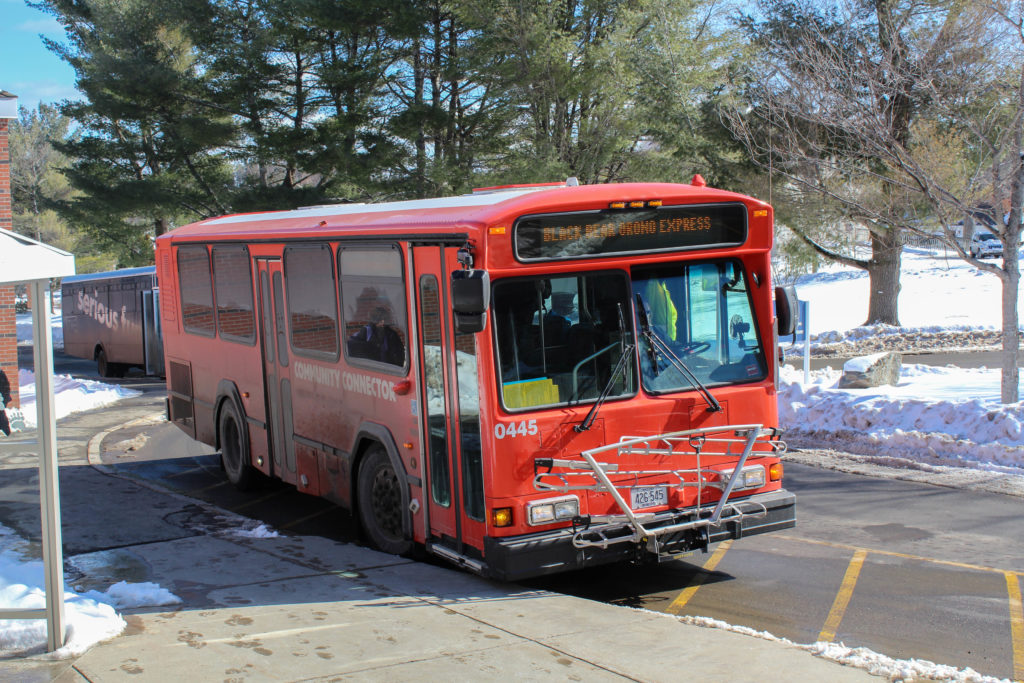
Students have several options for traveling around and near campus
- Black Bear Orono Express (FREE)
- Community Connector Schedule (FREE with MaineCard)
- Concord Coach Lines (Pick up & drop off right on Gym Drive)
- FlixBus
View the Public Transportation page for more details.

Pay or Appeal a Citation
If you receive a parking citation, it must be paid promptly. If the permit holder feels that they received their ticket in error, they have the option to appeal the citation.
Rec Center Parking
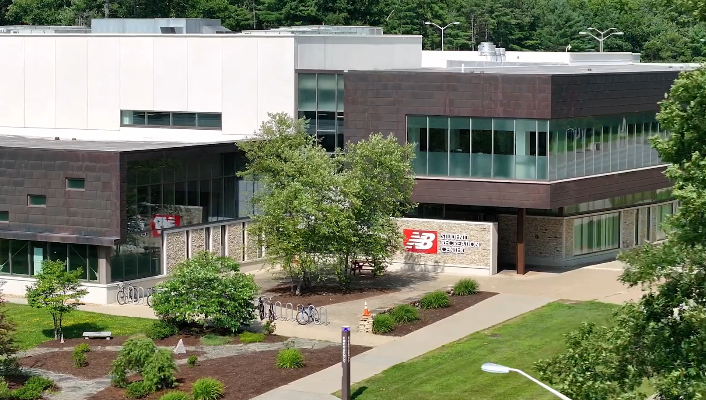
All faculty/staff members visiting the New Balance Recreation Center must have a parking permit to park in the Rec Center lot.

Bicycle Registration
Bikes on campus are encouraged and fun!
Visit the University of Maine Police Department to register your bike on campus. Please bring your bicycle information including any unique identifiers as part of the bicycle registration process.
Athletic Events & Tailgating
Let’s Go Black Bears!
Looking for parking for the big game? Find parking spots by visiting the Athletics & Tailgating page.

Towing Information
If your car gets towed, please contact Silva’s Towing.
Silva’s Towing
679 Stillwater Ave.
Old Town, ME 04468
Tel: 207-249-8399
All tow fees, holds, and services are handled through Silva’s Towing directly.
Please reference UMaine’s Towing Policy in Section G of the full Rules and Regulations for more detailed information.
Motorist Assistance
Emergency or Mechanical Failure
If your vehicle experiences an emergency or mechanical failure, please contact:
Parking and Transportation Services: 207-581-4047 (8:00 am – 4:00 pm)
University Police Department: 207-581-4040 (after 4:00 pm)
The vehicle owner or driver is responsible for arranging to have the vehicle moved as soon as possible, or as otherwise directed.For additional campus safety and security resources, please see the Black Bear Safe App.

Jump Start Requests
The University of Maine Parking and Transportation Services office provides complimentary vehicle jump starts on campus when officers are available. This service is provided Monday through Friday from 8 am until 4 pm excluding University recognized holidays.
Monday – Thursday
8 a.m. to 4 p.m.
Call 207-581-4047
Monday – Friday
Past 4 p.m. & weekends
Call 207-581-4040

Loading Zone Pass Requests
Are you moving in or out of an office? Do you need to load or unload large items? If so, please request a loading zone pass at the Parking Office, either in person or via an email request. This will allow you to park in the loading zone area of the building without issue. Fire lanes should never be used for this purpose.
