How to Access GL Inquiry
From the MyCampus Portal, locate the MaineStreet section (below the “LaunchPad” area) and select “GL Inquiry”
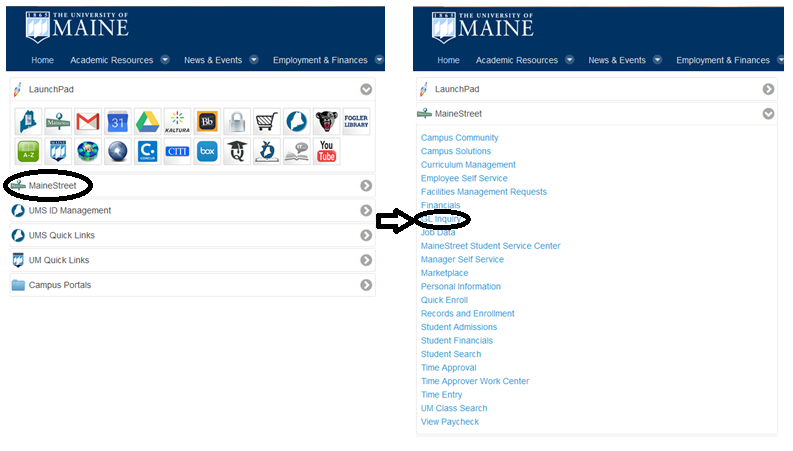
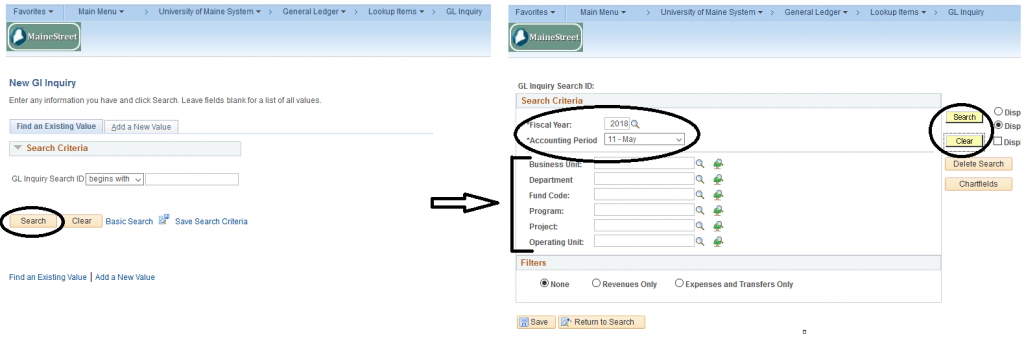
You can add GL Inquiry to your favorites for future use (“Add to Favorites” link on top right of screen. From the “New GL Inquiry” screen, click on the Search button which brings you to a new “GL Inquiry Search ID” screen. Then enter the appropriate Search Criteria (Fiscal Year, Accounting Period, and Account Criteria). Click search or Enter. Click on the appropriate account link. This will bring you to a new screen titled “GL Inquiry Search ID” with all account information, budget, and actuals.
Budget and Business Services will work with individuals who need help with GL. This training is for both staff and faculty who currently have access to MaineStreet Financials in their current work situation. Please visit the UMaine Finance Office webpage for more information.
Return to